Making a TDS payment online has become a convenient way to handle tax-related obligations digitally. Instead of relying entirely on physical paperwork, eligible taxpayers and deductors can use the Income Tax Department’s online facilities to initiate payments, generate relevant references, complete transactions, and maintain digital records. However, accuracy is important at every stage because incorrect information can create reconciliation or compliance difficulties later. The following ten sections explain the process in a practical sequence, from opening the official portal to preserving the final payment receipt. Always verify the current requirements and applicable tax provisions before completing an actual transaction.
Contents
- 1 Visit the official Income Tax e-Filing portal
- 2 Open the e-Pay Tax service
- 3 Select the appropriate tax-payment category
- 4 Choose the applicable deductee type and tax details
- 5 Enter the required TDS/TCS payment information
- 6 Review the tax breakup carefully
- 7 Generate the challan/payment reference
- 8 Select an available payment method
- 9 Complete the transaction through the selected bank or payment gateway
- 10 Save the payment receipt and challan details
- 11 Useful TDS Payment Record Checklist
- 12 Conclusion
Visit the official Income Tax e-Filing portal
The first step in the TDS payment online process is visiting the official Income Tax e-Filing portal. Users should make sure they are accessing the genuine government website rather than an unofficial service claiming to process tax payments. The official portal provides access to different tax-related services, including online payment facilities. Depending on the type of transaction, users may need to log in before accessing particular functions. It is useful to keep relevant information ready, including PAN or TAN details, tax information, and payment records. Starting from the official portal creates a secure and organized foundation for completing the remaining steps.
Open the e-Pay Tax service
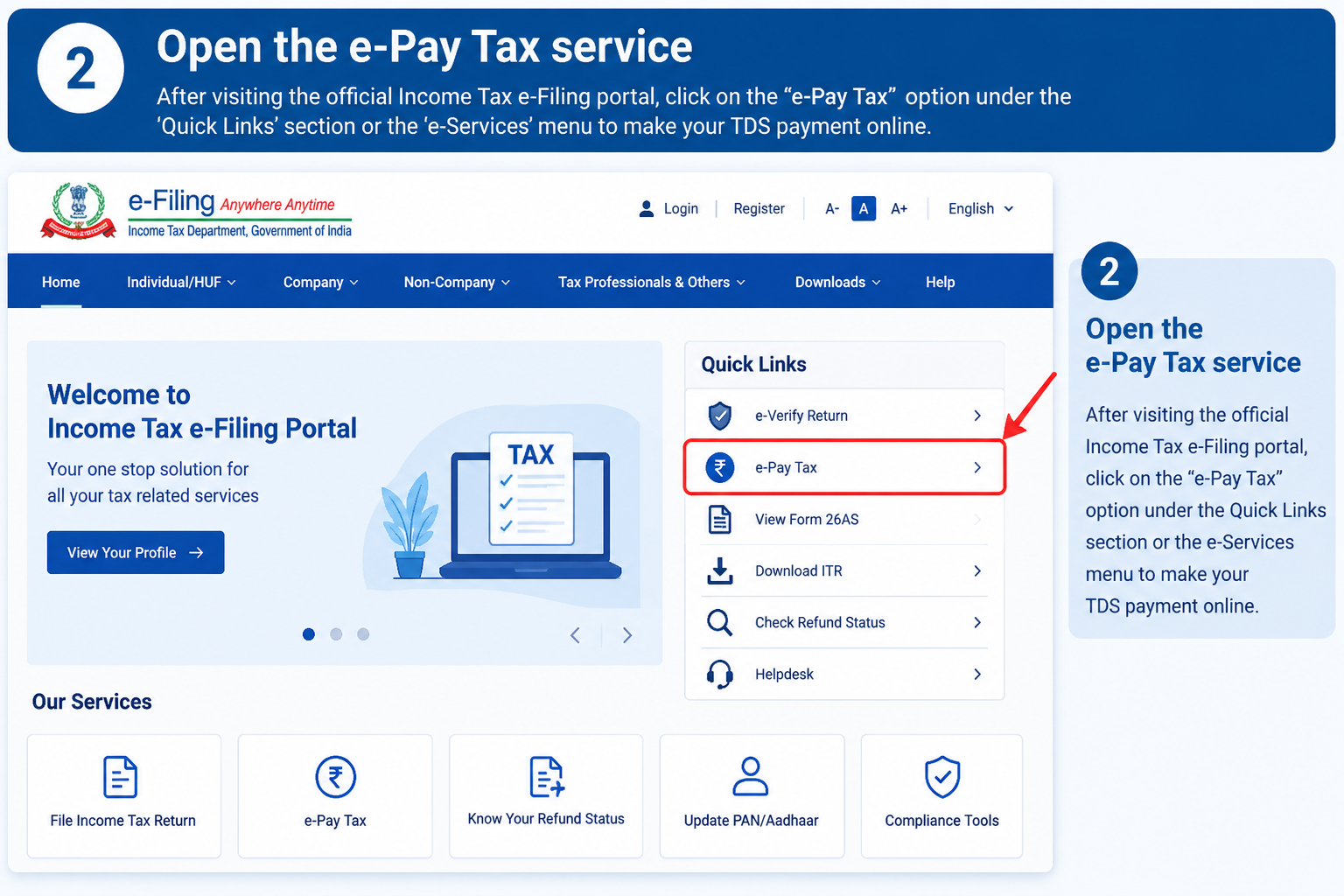
After accessing the e-Filing portal, the next step is to open the e-Pay Tax service. This facility provides a digital route for making eligible tax payments through the Income Tax Department’s online system. Users should carefully follow the options presented on the screen and identify the payment facility relevant to their transaction. For TDS or TCS-related obligations, the appropriate TDS/TCS payment option should be selected rather than choosing a general tax category without checking. The e-Pay Tax system can make the overall process more streamlined by connecting payment information, challan generation, and available payment methods within a single digital workflow.
Select the appropriate tax-payment category
Selecting the correct tax-payment category is an important part of the online TDS process. The portal can present different categories depending on the type of tax being paid and the circumstances of the transaction. Users should identify the category that corresponds specifically to their TDS or TCS obligation. Choosing an incorrect category can result in payment information being recorded incorrectly and may create additional reconciliation work. Before making the selection, users should consider the nature of the payment, applicable tax year, and relevant tax provisions. A careful selection at this stage helps ensure that subsequent information is entered into the appropriate payment structure.
| Check Before Selecting | Why It Matters |
|---|---|
| Payment type | Helps identify the appropriate category |
| Tax year | Ensures the correct period is selected |
| TDS/TCS status | Separates relevant tax-payment requirements |
| Applicable provision | Helps determine the appropriate transaction details |
Choose the applicable deductee type and tax details
Once the payment category has been selected, users need to choose the applicable deductee type and provide the requested tax details. The classification should correspond to the actual recipient and transaction rather than being selected based on assumption. Other information requested by the portal should also be entered carefully. This stage deserves attention because tax requirements can vary according to the nature of the payment and the parties involved. Users dealing with straightforward transactions may find the process relatively simple, while businesses handling multiple categories of payments should verify each transaction individually. Where the applicable tax treatment is uncertain, professional tax advice may be appropriate.
Enter the required TDS/TCS payment information
The next stage is entering the required TDS/TCS payment information into the relevant fields. The information requested can vary depending on the payment category and applicable rules. Users should refer to their accounting records and supporting documents rather than estimating amounts while completing the form. PAN, TAN, payment amounts, tax details, and other requested information should be checked carefully before proceeding. For businesses, maintaining organized records before beginning the online payment can make this step faster and reduce errors. A useful practice is to compare the information entered on the portal with the original accounting entry before moving to the review stage.
Review the tax breakup carefully
Before proceeding with payment, users should carefully examine the tax breakup displayed by the system. This is one of the most valuable opportunities to identify an error before the transaction is finalized. The tax amount, applicable components, tax period, payment category, and other displayed information should be compared with the underlying records. If the figures do not match, users should investigate the discrepancy before continuing. Rushing through this stage can make an otherwise simple payment more complicated later. A few minutes spent reviewing the details can help reduce mistakes and make subsequent accounting and tax reconciliation easier.
| Review Item | What to Check |
|---|---|
| Tax amount | Matches the calculated liability |
| Tax period | Correct year or applicable period |
| Payment category | Appropriate for the transaction |
| Deductee details | Accurate and complete |
| Total amount | Matches the intended payment |
Generate the challan/payment reference
After reviewing the information, users can proceed to generate the relevant challan or payment reference. This reference is important because it identifies the tax-payment transaction within the online system. Depending on the applicable process, the generated information may include a unique reference number and details relating to the payment. Users should review the generated information before proceeding to the actual payment stage. It is also advisable to retain a digital copy or screenshot where appropriate, although the official receipt should remain the primary record. Having the reference available can be helpful when tracking payments or reconciling them with business and banking records later.
Select an available payment method
The next step is selecting an available payment method. Depending on the applicable arrangements, online tax-payment facilities may provide several options, such as net banking, debit card, RTGS/NEFT, or payment gateway-based methods. The precise options shown can depend on the transaction and current portal arrangements. Users should select a method that is appropriate for their circumstances and verify the amount before authorizing payment. For larger business payments, banking limits and transaction procedures may need to be considered in advance. Users should also ensure that the account or payment instrument has sufficient funds so the transaction can be completed without unnecessary interruption.
Complete the transaction through the selected bank or payment gateway
Once the payment method has been selected, the user can continue to the relevant bank or payment gateway and complete the transaction. The payment provider may request authentication or authorization through its normal security process. Users should follow the instructions carefully and avoid closing the browser or repeatedly refreshing the page while the payment is being processed. After successful completion, confirmation should be checked before taking further action. If a transaction appears unsuccessful or remains pending, users should first verify its status before making another payment. This is particularly important because immediately repeating a payment could potentially create duplicate-payment complications.
Save the payment receipt and challan details
The final step is saving the payment receipt and challan details after completing the transaction. These documents provide important records for future reference and can help with accounting reconciliation and tax-related documentation. Users should preserve the payment reference, challan information, transaction date, amount, and confirmation details in a secure location. Businesses can maintain separate digital folders for different tax periods to make future searches easier. It is also useful to compare the payment record with the corresponding accounting entry. Keeping organized documentation can become particularly valuable when preparing tax returns, reviewing historical transactions, or responding to a future tax-related query.
Useful TDS Payment Record Checklist
| Record | Recommended Action |
|---|---|
| Challan/payment reference | Save securely |
| Payment receipt | Download and retain |
| Transaction date | Record in accounts |
| Amount paid | Reconcile with accounting records |
| Bank/payment confirmation | Keep as supporting evidence |
| Tax details | Maintain with related documents |
Conclusion
The TDS payment online process can be understood as a sequence of ten connected steps: accessing the official Income Tax e-Filing portal, opening e-Pay Tax, selecting the correct category, entering deductee and tax information, checking the tax breakup, generating the payment reference, choosing a payment method, completing the transaction, and finally preserving the receipt. The most important principle throughout the process is accuracy. Users should verify tax details before payment and maintain proper records afterward. Because tax rules, portal features, payment options, and procedures can change, current official Income Tax Department instructions should always be checked before making an actual TDS or TCS payment.